
Social Engineering: What It Is, Types, Examples, and How to Prevent It
Social engineering is a manipulative technique that tricks people into giving up information, securing access to restricted systems, sending money or taking any other action that benefits an attacker. Instead of relying on technical skills, attackers exploit human vulnerabilities and prey on helplessness, trust, fear, urgency or authority.
Some common examples of this kind of cybersecurity attack include phishing emails, fake calls, deceitful text messages, business email compromise, login pages that are forged and impersonation.
As you dive into this article, it explains what social engineering is, the stages of social engineering and its types, how they work, the warning signs to watch out for, and the practical ways to avoid them.
For a broader understanding of cybersecurity, read our Cybersecurity Guide, which covers common cyber threats, security practices, and ways to protect systems and data.
What Is Social Engineering?
Social engineering is a manipulative technique that exploits human error to gain private information, access to restricted systems, or take an action that works in favour of the attacker.
The primary target in this attack is human behaviour rather than a technical vulnerability. It can be executed through various channels. An attacker may pose to be a bank employee, IT support, administration, team manager, government employee or any trusted person.
The attacker may then manipulate the victim reveal the following information:
- Share a login password or verification code
- Click a malicious link
- Open an attachment
- Approve an MFA request
- Send money
- Change the banking details
- Install software
- Provide sensitive information
A social engineering attack can be successful even if the victim’s devices and software are secure because the target is tricked to perform the action themselves.
How Does Social Engineering Work?
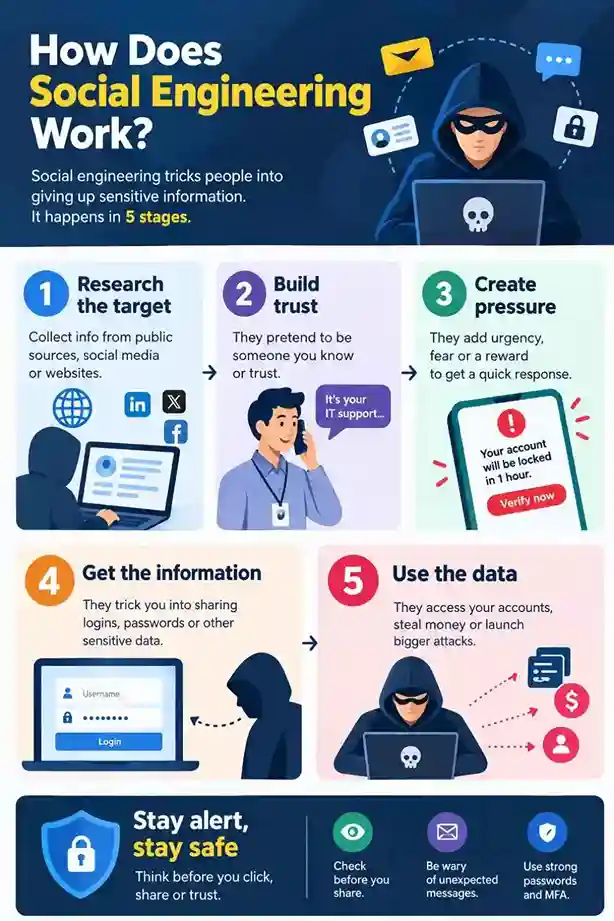
The stages of the social engineering attacks follow a basic pattern
Research/prepare → Establish trust → Create a sense of urgency → Request an action → Use the result
Attackers gather the information about their target from various sources like social media, public websites, and company directories. They use this intel and determine the best way to exploit the target. By using the details like a person’s job, employer or email addresses to make it seem more trustworthy.
The attacker then creates valid reasons to open a line of communication with the target. For example, they may pretend that a user account needs to be verified or an employee in an organization needs to complete a pending IT request.
The final step is a call to action, such as sending money, authorising an MFA request, clicking a link, opening an attachment, sharing access or providing credentials.
The information that is stolen can then be used for theft, fraud, malware delivery, account takeover or other attacks.
Common Types of Social Engineering Attacks
| Type | How it works |
| Phishing | Uses deceptive messages to trick people into revealing information or taking an unsafe action. |
| Spearphishing | Targets a specific person or organization with a tailored message. |
| Whaling | Targets high-value individuals, such as executives. |
| Smishing | Phishing through SMS or text messages. |
| Vishing | Phishing through SMS or text messages. |
| Business email compromise (BEC) | Uses impersonation or compromised accounts to trick businesses into making payments or revealing information. |
| Pretexting | Creates a false story or identity to obtain information or access. |
| Baiting | Uses something attractive to persuade someone to take an unsafe action. |
| MFA fatigue | Repeatedly sends authentication requests in the hope that a victim eventually approves one. |
| Tailgating | An unauthorized person follows an authorized person into a restricted physical area. |
NIST identifies phishing, pretexting, impersonation, baiting, quid pro quo, threadjacking, social media exploitation, and tailgating among forms of social engineering.
Warning Signs Of Social Engineering
A message that you have received can look professional and still be deceitful. Keep an eye out for these warning signs:
Unexpected Requests
Be careful when someone suddenly asks you to:
- Share MFA codes or login credentials
- Send money
- Change your payment information
- Open an attachment
- Install software
- Give access remotely
- Provide sensitive or confidential information
Urgency or Pressure
Time and again, attackers try to prevent their victims from thinking conscientiously. Hence, one should be suspicious of the texts that demand you to act immediately or your user account, job, payment or access will be impacted.
Suspicious Links
Before entering any information that is opened by clicking any links, make sure to take time to check the sender’s address and the website URL carefully. A website that is fake can be designed to look exactly similar to a legitimate one.
Unusual Payment Requests
Make sure to treat sudden requests to change bank information or transfer payment as high risk. Check them via a separate communication channel.
Unexpected MFA Requests
Make sure to not approve any authentication requests when you did not make any attempt to sign in to your accounts. Frequent unexpected prompts is a sign of MFA fatigue.
How To Prevent Social Engineering?
There is no single security control that prevents every social engineering attack. Constant use of several layers of protection might help reduce the changes of being a victim.
Stop and Verify
If you receive a request that involves money, login credentials, sensitive information, or unusual access from an unknown source, pause and take a step back before responding.
Always remember to verify by using the information you already trust. For example, if you receive an email that claims to be sent from a bank, make sure to open the bank’s official website or banking app yourself rather than clicking the link from the email.
Use Multifactor Authentication
MFA adds an extra layer of security beyond a password. Use phishing-resistant MFA wherever possible. Keep in mind to never approve an MFA request just because it appears on your mobile phone. Approve only the requests that you initiated.
Use Unique Passwords
Do not set up the same passwords across important accounts. By using a password manager, it can help you create unique passwords and store them.
Limit Public Information
Attackers make use of the information that is available publicly to create more trustworthy messages. Always be cautious of sharing sensitive information and avoid unnecessarily exposing the details about your job, personal address, colleagues, or daily activities.
Verify Financial Requests Separately
Businesses should verify requests independently to change the supplier bank details or specific payment procedures. Instead of the contact information that appears in the new request, make use of the previously known phone number or any other means of trusted communication.
Train Employees
Employees in an organization should be regularly trained to identify phishing, impersonation, suspicious email attachments, fake links and unexpected MFA prompts.
Employees should also be trained on how to respond to these tactics from the attackers and how to report them. Employees should be aware what to do in case they click a suspicious link or answer a fraudulent request.
What to Do If You Fall for a Social Engineering Attack
Preventing Social Engineering requires a multi-faceted approach that addresses both technical vulnerabilities and human behaviour. If you fall for a social engineering attack, perform the following actions:
Take immediate action. If you share the password, make sure to change it quickly. If you have reused that across other important accounts, change it in them too.
If you shared sensitive financial information or sent money through your bank, contact your financial institution immediately without delay. If you have typed in your login credentials on a fake website, change those affected credentials from another trusted device.
If you installed suspicious software or gave someone unauthorized remote access to your system, contact your IT support or security team and follow the incident response process of the organization.
Store the original emails, texts, contact numbers, URLs and other evidence. By reporting the incident quicker can help reduce damage and limit the access. It might help your organization to investigate and prevent similar attacks.
How AI Is Changing Social Engineering?
In recent days, AI makes some social engineering campaigns easier to create and scale. Attackers make use of AI-assisted tools to generate convincing texts, translate messages, create fake content and support targeted phishing attacks.
Microsoft has reported that the attackers use the large language models that support social engineering attacks, which includes drafting of phishing messages.
This indicates the spelling and grammar of the message are no longer trustworthy ways to judge whether a message is legitimate.
A message may look professionally written but still be malicious. In such cases, confirm the sender, the request, destination and the action that is being requested.
Frequently Asked Questions
1. What Is Social Engineering In Cybersecurity?
Social engineering is a manipulative technique used by the attackers to trick people to reveal private information, provide access, send money or perform any other action that helps the attacker.
2. What Is The Most Common Example Of Social Engineering?
Phishing is the most common example of a social engineering attack. It uses digital communication methods to trick people into revealing sensitive data, clicking links, or deploying malicious software.
3. Is Phishing A Type Of Social Engineering?
Yes, phishing is a most common social engineering attack because it uses deception to persuade a person into taking an action or revealing sensitive data.
4. Can Social Engineering Bypass MFA?
Some attacks can exploit certain MFA methods. For example, MFA fatigue is an attack where an attacker attempts to trick people into approving fraudulent authentication requests. In such cases, Phishing resistant MFA can provide more protection against phishing based attacks.
Also Know About: Ransomware: How It Works, Costs, and How to Stop It
