
Apple TV 4K Review: Is It Worth Buying?
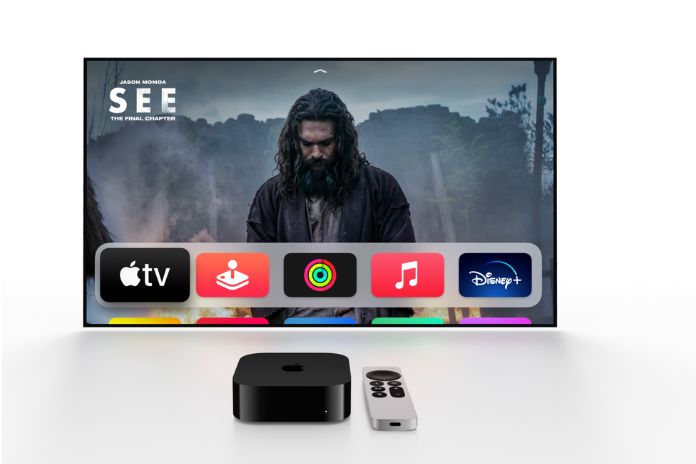
Apple’s new TV box looks exactly like the old one and, at first glance, doesn’t do much more. But the impression is deceptive. Whether you need the innovations today is another question.
Considering Apple product cycles, one could believe that Apple TV hardware is still a hobby for California. The device is what Steve Jobs once called the streaming box. There is hardly any other explanation for the new version appearing only after a four-year break and for it not differing much from its predecessor, at least on the outside. Apple’s TV box has had the same basic design for eleven years, just got a little thicker over time, and has fewer and fewer connections. Even the price has remained unchanged: 199 euros for the version with 32 gigabytes (GB) of memory and 219 euros for the 64 GB version.
As is so often the case, what is more important is what has happened inside the box. There is a new chip in it, the A12 Bionic, which was used in the iPhone XS. Of course, it has more power than the A10X-Fusion chip of its predecessor, but you don’t notice it. The new Apple TV 4K feels just as fast as its predecessor and is fast enough for everything you do with it: watching films and series, trying out apps, and playing games.
Apple TV 4K: Key Specifications
| Feature | Apple TV 4K |
| Chip | A12 Bionic |
| Storage | 32 GB / 64 GB |
| Video | 4K, HDR |
| HDMI | HDMI 2.1 |
| Wireless | Wi-Fi 6 |
| Audio | Dolby Atmos |
| Remote | Siri Remote |
| Smart home | Thread support |
Connectivity and Display Support
Wi-Fi 6 now provides Wi-Fi connectivity. It is designed to support newer wireless standards but may make little difference for users who do not have a compatible Wi-Fi 6 router. The same goes for thread integration. This technology is designed for smart home networking, but many users may not yet have compatible equipment at home.
The Apple TV 4K is connected to a television via HDMI. The new model supports version 2.1, which offers several advantages over version 2.0 in the previous model, such as almost three times the bandwidth, enabling higher resolutions with more frames per second. With the Apple TV 4K, this means that it can output films in 4K resolution with high dynamic range (HDR) and Dolby Atmos audio at 60 frames per second, provided that the TV supports these features.
More important, however, is an innovation that puts Apple’s decision to discontinue production of the HomePods in a strange light: thanks to HDMI 2.1, the box now also supports the so-called audio return channel (ARC), which is known as ARC or eARC on compatible HDMI sockets.
This feature makes it possible to use Apple’s loudspeakers for content played on the television, whether it is Netflix, a regular TV programme, or a game console. It also works with Dolby Atmos. This suggests that Apple has probably not yet made its final decision on the HomePods – and possible successors.
If you want to listen privately, you can also connect up to two pairs of AirPods, AirPods Pro or AirPods Max to the device and enjoy excellent sound late at night without disturbing family members or neighbours. Some TVs also support Bluetooth headphones.
A Redesigned Remote Control
The only external appearance that has changed is the remote control, which is now made from a block of recycled aluminium and is the real highlight for many. Apart from being larger and heavier than the previous model, the arrangement and function of the buttons have fundamentally changed. A rotating ring has replaced the rectangular touchpad. Very practical: As soon as you have pressed the pause button, the rotating ring becomes a fast-forward and rewind button, which you can use to fast-forward or rewind through long films much faster than before.
The clever solution is that the Siri button is now attached to the side, where you press the button on compatible iPhones to call up Apple’s digital assistant.
Calibrating TV Colours With an iPhone
You also need a current iPhone with Face ID to use a function that calibrates the TV’s colour rendering. To do this, the iPhone’s sensors measure the colour bars displayed on the television by the Apple TV. A specific colour profile for the respective TV is then calculated from these measurements.
That sounds great. It’s straightforward and made only a barely noticeable difference to the original image in my test. Have I set my TV that well? If you want to use colour calibration, you should note that it is only practical when using the Apple TV. As soon as you switch to another video source or the TV programme, you will see the non-calibrated picture again. The feature was introduced on older models with tvOS 14.5.
Who Needs the Apple TV 4K?
The question remains who actually needs such a device. After all, many current televisions already have essential streaming apps from providers such as Netflix, Amazon Prime Video, Disney+, and often Apple TV+ on board or can install them. Older devices that lack these features may not be able to use some of the new Apple TV’s capabilities, as they do not support 4K resolution or HDR.
Apple TV 4K: Pros and Cons
👍 Very good audio and video functions
👍 Extensive range of apps and streaming services
👍 Audio output on HomePods and AirPods
👍 HDMI 2.1 with ARC
👎 High price
Conclusion
In my view, the Apple TV 4K is a capable streaming box, especially for iPhone users who stream via the small box and want to watch their videos and pictures from iCloud or play them from their mobile phones. Some may even use such a device as a game console replacement or use it to search for their vacation flights with apps like Kayak, but its main purpose remains streaming and digital entertainment.
And if the TV doesn’t offer the apps you need, you can get that with a Fire TV Stick from Amazon or a Chromecast from Google at a lower price than the Apple TV 4K. However, you have to do without Dolby Atmos via HomePods, colour calibration via iPhone, and extras such as Wi-Fi 6, support for Thread networks, and HDMI 2.1.
