
How To Create A QR Code? [Step By Step Guide]
![How To Create A QR Code? [Step By Step Guide]](https://techgloss.com/wp-content/uploads/2022/04/How-To-Create-A-QR-Code-For-Personal-Use.jpg)
A QR code (Quick Response code) is a two-dimensional (2D) barcode that allows users to quickly access information when they scan the code with a smartphone camera. The main purpose of the barcode is to open the websites, share contact details, download files, or make payments etc.
In this article, let’s know the details on how to create a QR code in easy steps using free tools on both mobile and desktop devices.
Key Takeaways
- QR codes can be created in less than a minute using free tools.
- No coding or technical skills are required.
- You can create QR codes using websites, browsers, or mobile phones.
- Static QR codes are free but cannot be edited later.
- Dynamic QR codes allow tracking and future updates.
What Is A QR Code?
A QR code is a square shaped two-dimensional (2D) barcode that can store information like website link, menu of the restaurants or payment details etc. When the user scans the QR code using their smartphone camera, it quickly redirects the user to the information stored on the QR code.
QR codes are widely used in the following areas:
- Marketing campaigns.
- Restaurants (digital menus).
- Payments.
- Product packaging.
- Event tickets and flight tickets.
How Does QR Codes Work?
When you look at the QR code you will observe a pattern of black and white squares. These black and white squares store the information. When users scan the QR code using a smartphone camera or QR scanner app, the smartphone detects the pattern and redirects the user to the stored information such as a website, restaurant menu, payment details or product tracking info etc.
When a user scans a QR code, the following process happens:
The QR codes are popular and fast because they can store more information compared to the regular barcodes. Because these are fast, easy to scan with a smartphone device and saves time for the users by quickly providing the information.
How To Create A QR Code (Step-by-Step)
Method 1: Using An Online QR Code Generator
Using an online QR code generator is one of the easiest methods to create a QR code for your personal use. Below is the step by step process to create a QR code using a code generator.
Steps:
1. First, you need to open QR code generator websites such as QRCode Monkey or QRStuff.
2. Select the type of QR code you want to generate. Because you can find the options like website, text, pdf, images etc.

3. Enter your information (for example, your website link)

4. After entering the information you can also design your QR code shape, frame, logo etc.
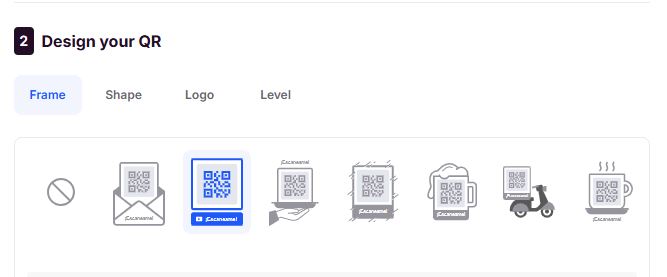
5. Now you Download the QR code image

6. You can test the downloaded QR code by scanning with your phone.
Method 2: Using Google Chrome (Desktop)
You can also create QR codes quickly by using Google Chrome.
Steps:
1. Open any website in Google Chrome.
2. Right click on the website where you can see the “Create QR code for this page” option.

3. After clicking the option you can see the QR code is generated.
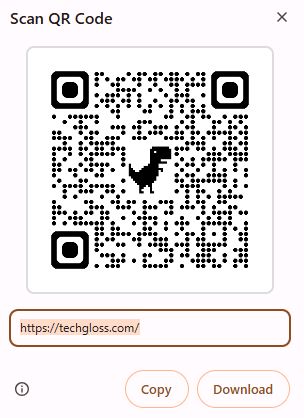
4. Now you can download or copy the QR code for your personal use.
Method 3: Using Mobile Phone (Android / iPhone)
Steps:
1. Open Google Chrome on your mobile phone.
2. Visit the website you want to convert into a QR code.
3. On the top right corner of the url you can see the Share button.

4. After you tap the Share button you can see the “ Create QR code” option”.
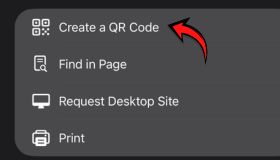
5. Now click on the option and your QR code for your personal use.

Static vs Dynamic QR Code
| Type | Description | Edit Option | Tracking |
| Static QR Code | Stores fixed information | ❌ No | ❌ No |
| Dynamic QR Code | Editable after creation | ✅ Yes | ✅ Yes |
- Static QR codes are best for personal use.
- Dynamic QR codes are best used for businesses and marketing.
Know The Best Uses of QR Codes
QR codes have many advantages and are widely used in our everyday life:
- Used in sharing website links.
- Digital business cards.
- Restaurant menus.
- Online payments.
- WiFi access sharing.
- Event registrations.
- Product packaging.
- Flight tickets scanning.
Benefits Of Using QR Codes
- Users can easily and quickly know the information just by scanning the QR code.
- There is no need to type and search for the information.
- QR codes save time and are easily accessible for users.
- Users can scan the QR codes in all types of smartphone devices.
- QR codes can be used for both personal purposes and businesses.
Common Mistakes To Avoid
- Avoid using low-quality QR code images.
- Check the QR code by scanning with your smartphone before sharing it to others.
- Using very small QR codes in print materials.
- Don’t forget to choose the correct content type.
FAQs – Frequently Asked Questions
1. Can I Create A QR Code For Free?
Yes, you can create a QR code for free. There are QR code generators which generate QR codes for free.
2. Do QR Codes Expire?
Static QR codes do not expire, but dynamic QR codes may expire. This depends on the service provider.
3. Can I Edit QR Codes After Creating it?
You can only edit dynamic QR codes after creation.
4. Do I Need An App To Scan QR Codes?
No, most modern smartphones can scan QR codes using the default camera app.
5. Are QR Codes Safe?
Yes, QR codes are generally safe but only scan QR codes from trusted sources.
Conclusion
Creating a QR code is very simple, fast, and requires no technical knowledge from the users. Whether you use an online tool, Google Chrome, or a mobile phone, you can generate a QR code in just a few steps. In today’s digital world, most of the businesses, marketing, education sectors are using the QR code.
Also Read:
